Introduction
Word documents are everywhere. In domains such as legal, finance, and healthcare, the Word document is the deliverable. Contracts, regulatory submissions, and audit reports get drafted, redlined, and signed in .docx, and companies usually have libraries of Word templates they work with on a regular basis.
That work is increasingly shifting to agents. Microsoft Copilot and Claude in Word have made in-document AI mainstream, while a growing number of vertical agents; particularly in legal tech—need to interact with .docx files.
In this post, we wanted to see where things stand today when it comes to editing .docx files in complex tasks. To find out, we used Harvey LAB, Harvey's open-source Legal Agent Benchmark. It's built from real client matters, and each task asks an agent to work through the case materials and produce a finished legal deliverable, which then gets graded against expert-written rubrics.
As of this writing, it contains 2,010 tasks across 27 practice areas. We measured pass rate and all-pass rate, along with efficiency metrics like latency, cost, and token count.
Background
In general, there exist several ways for agents to edit Word docs today, which mainly fall into three categories:
- Letting agents write code that uses low-level SDKs such as python-docx / aspose / Open XML SDK.
- Connect MCPs such as SuperDoc, Office CLI or Adeu that provide opinionated tools for the agent.
- Round-trip the Word document through a lossy projection i.e. convert to Markdown/HTML using something like pandoc/mammoth.js, let the agent edit it and convert it back to .docx.
Experiment Setup
In this experiment, we chose to evaluate the first two options (libraries and MCPs). We skipped the third one because a DOCX → Markdown → DOCX round trip loses the styles and formatting of existing Word documents.
We picked 5 tools, which serve as our experiment arms.
- MCP servers
- SuperDoc MCP - v1.5.0
- Office CLI (via MCP) - v1.0.155
- Adeu MCP - v3.0.7
- Stemma MCP - v0.6.0
- Baseline - Harvey LAB default DOCX skill
Each arm uses Harvey's agent harness and sandbox, with grok-4.7 as the agent model (high reasoning). The agent runs inside the sandbox (via Podman) and has access to bash, read, write, edit, glob, and grep. In the DOCX MCP arms, it also gets the tools the MCP exposes, and we unload the DOCX skill and remove some dependencies (more on that below).
A few more technical details
- Image support in the read tool - When the agent read an image it created (e.g. a .png), Harvey's read tool returned huge blocks of serialized bytes. We changed it to return a proper image in the tool result.
- Removing python-docx and docxtpl - When an agent struggles with an MCP, it sometimes falls back to python-docx instead. We wanted to prevent that, so we removed python-docx and docxtpl from Harvey's Dockerfile in the DOCX MCP arms.
- Steering toward the MCP - The system prompt tells the agent to use the DOCX MCP for docx-related tasks, and the read tool returns an error when it tries to read a .docx file directly, encouraging it to use the DOCX MCP tools instead.
- Measuring cheating - The agent could still get around the MCP with docxjs or pandoc (Markdown → .docx). We couldn't remove those because the sandbox needs LibreOffice and pandoc for reading files in general (e.g .xlsx, .pdf, .pptx), so we measured how often the model cheated in each arm instead.
- Running on Modal - We ran the experiments on Modal as serverless jobs, since tasks can take a long time and we wanted to run many of them in parallel.
Data
As we mentioned above, Harvey LAB contains 2,010 tasks across 27 practice areas. Not all of them require a .docx deliverable, since some only ask for an .xlsx or a .pptx. Our focus was also on editing rather than writing from scratch, so we used Jev to classify tasks that involve editing an existing .docx file. That left us with 360 tasks. To keep costs down, we ran the experiments on a stratified sample of 180 of them.
Each task (like this one) comes with a rubric, a list of criteria that an LLM judge checks one by one against the task's deliverables (e.g. "nda.docx"). Each criterion is binary, PASS or FAIL. The main metric is the all-pass rate, where a task only counts as a success if every criterion passes. We also report the mean rubric score, which shows how close an agent got when it didn't fully pass.
Our judge was grok-4.7 with high reasoning effort. Across all 2,010 tasks, the p50 number of criteria per task is 54, the p90 is 83, and the max is 1,114.
Results
Overview
The following graphs show the main metrics: mean rubric score, all-pass rate, cost per task, latency per task, and total cost:
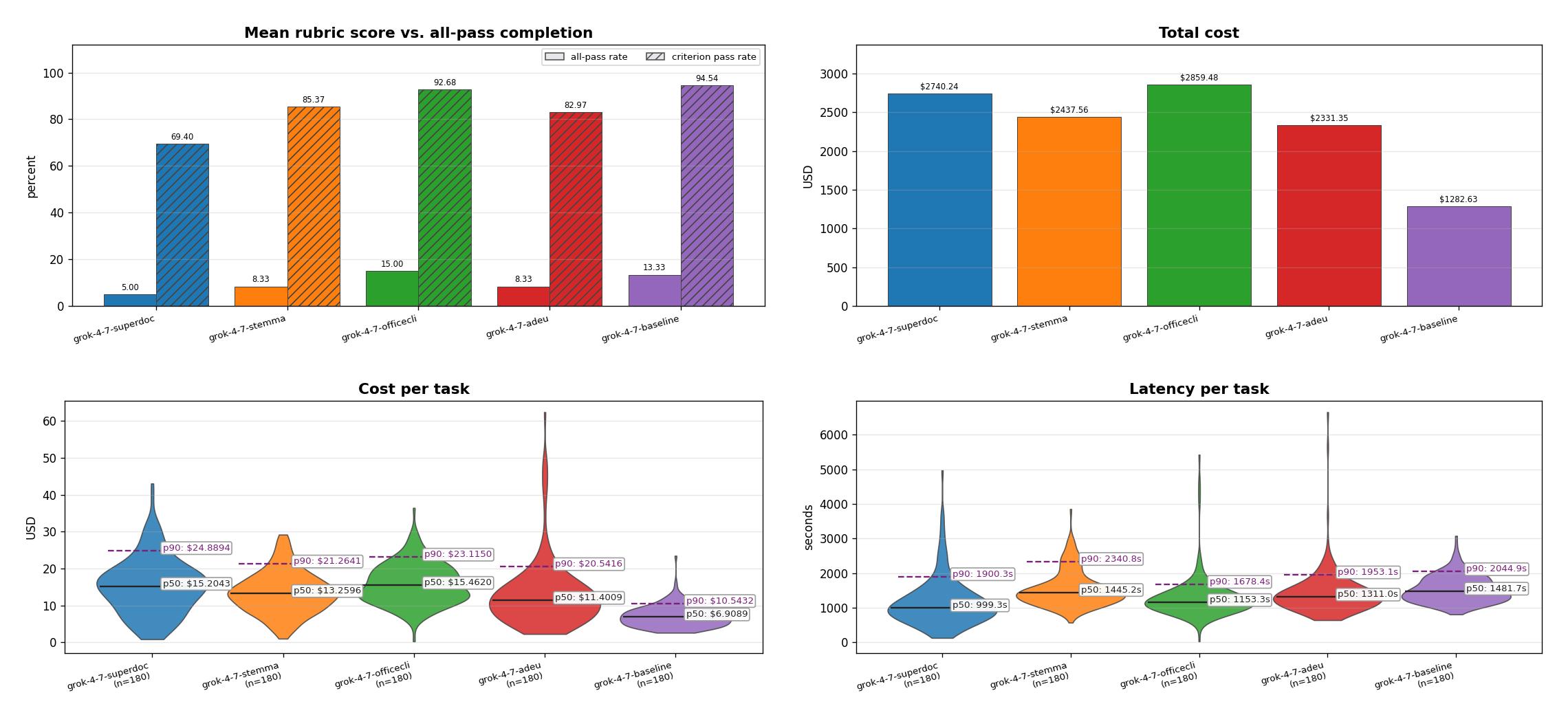
A few highlights from these graphs.
- The baseline arm (the DOCX skill, which uses python-docx and LibreOffice) got the highest mean rubric score, although it came second to OfficeCLI in all-pass rate.
- The baseline was also the cheapest by far. The next cheapest arm costs almost 2x as much.
- Some of the other arms had faster latency, but that doesn't tell the whole story. Looking closer, some of them hit a context window error during the run, since Harvey's harness doesn't have a compaction mechanism. We show the completion rate in a plot later.
The following plots also show input and output token consumption:
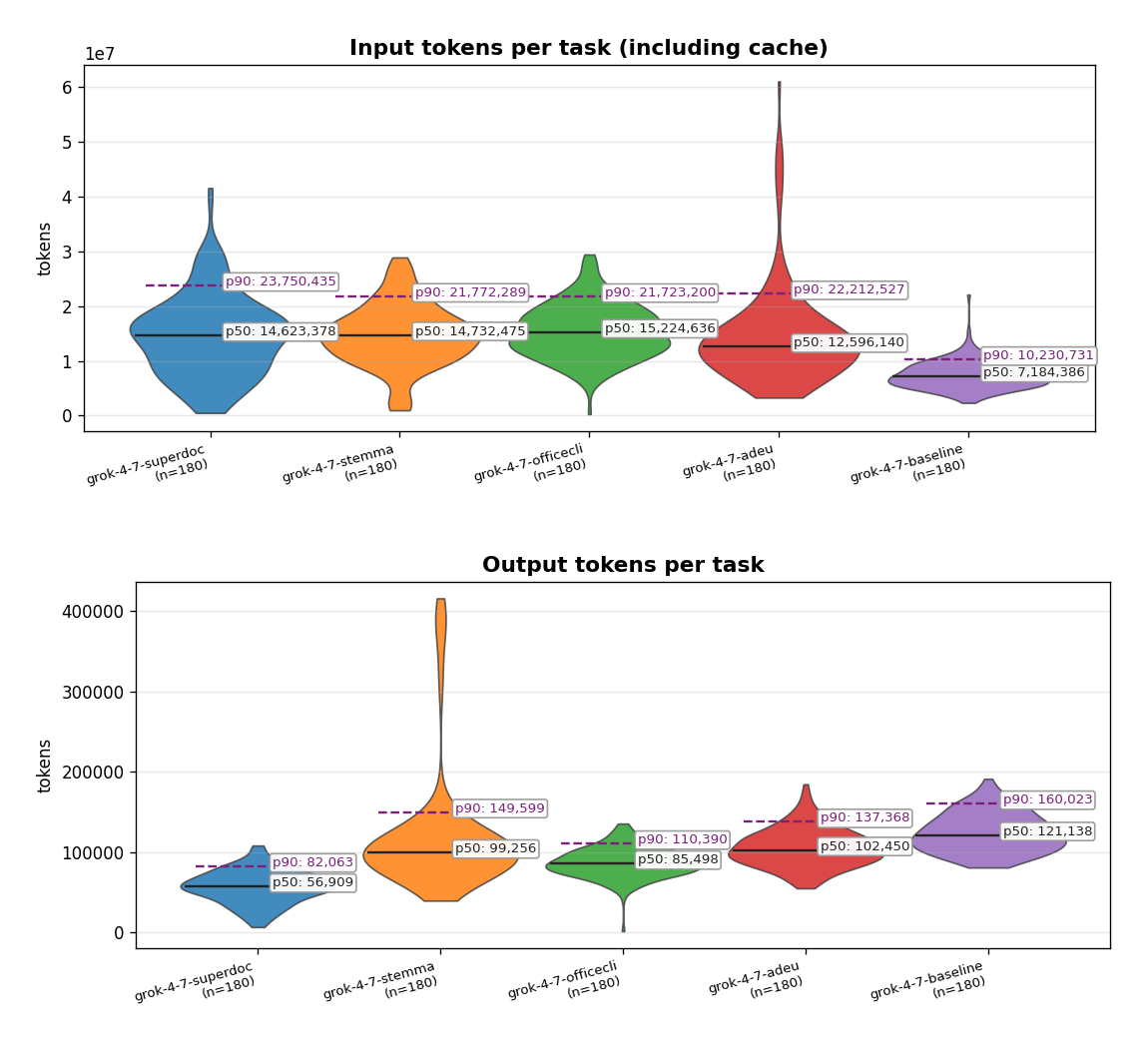
What we found interesting is that the tools that are supposed to reduce the agent's "cognitive" load actually consume more tokens overall, and by a wide margin compared to just letting the agent use python-docx and LibreOffice (even when the agent is outputting more tokens).
Completion rate
Like we said earlier, some arms didn't manage to finish all their tasks. SuperDoc, for example, hit a lot of context window errors caused by superdoc_inspect tool calls that returned big responses. Harvey's harness doesn't have compaction or tool result trimming, and we didn't add any, since we wanted each MCP to handle its own responses without us introducing bias. The following graph shows the completion rate across the experiment arms.
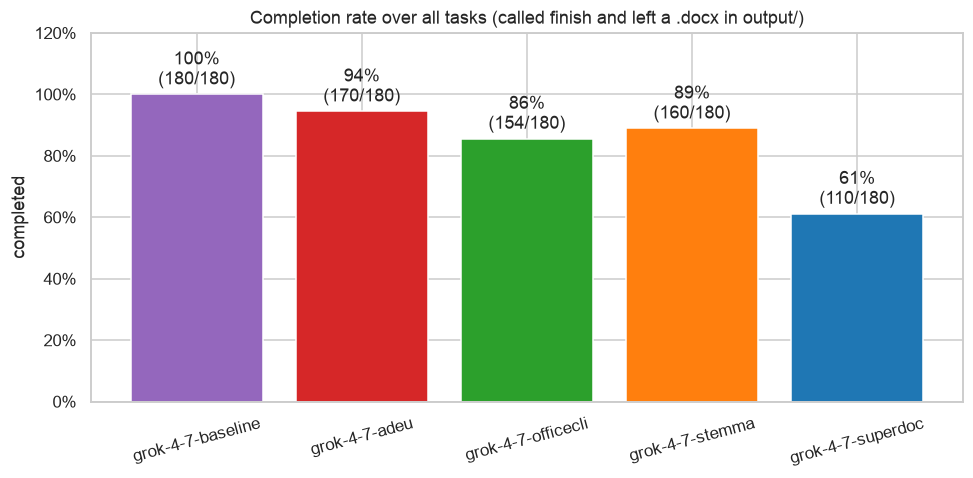
As you can see, the baseline was the only arm to finish all 180 tasks, while the MCP arms ranged from 61% (SuperDoc) to 94% (Adeu).
Editing-phase metrics
Now, we want to take a deeper look into the "editing" phase. Namely, during Harvey's tasks, the agent usually spends the first part of the task just exploring the materials (each Harvey task comes like this one with an "input/" folder that includes files the agent needs to read in order to complete the task). After this first part, the agent usually starts creating the deliverables. We wanted to see how hard it is for the agent to create it. Like we said before, in this experiment, we focused only on .docx deliverables (we left .md, .xlsx, .pptx and other file formats).
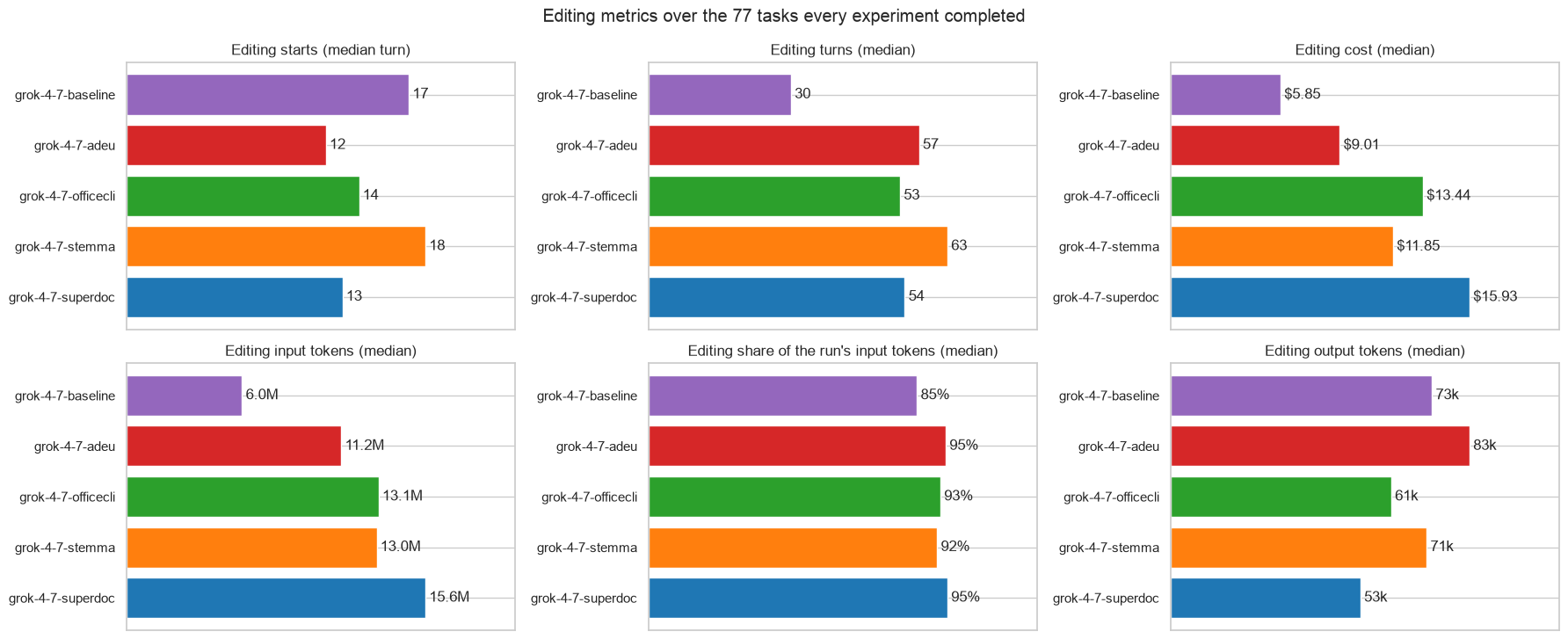
Some highlights here:
- The baseline had the cheapest and quickest editing phase, with a median of ~6M input tokens vs. 11.2M+ for the MCP arms, and $5.85 vs. $9.01+ in cost.
- In every arm, editing was the dominant part of the run, accounting for 85% to 95% of the input tokens.
We want to highlight that last point because it's counterintuitive. You'd expect the legal work itself to be the heavy part, but in the Harvey tasks that we chose, editing dominates across every dimension (latency, cost, and tokens). In other words, dealing with the .docx itself (paragraphs, tables, lists, formatting, etc.) takes a real toll on the agent. Even the baseline's 6M input tokens is not a trivial amount, especially for users on smaller Anthropic/OpenAI subscriptions.
Cheating ratio
In the DOCX MCP arms, a call counts as cheating when the agent touches a .docx file with its built-in tools instead of the MCP. A few examples of what counts:
- Reading or writing .docx content through bash, e.g. inline Python with python-docx, a
.pyscript that touches a .docx, orpandoc -t docx. - Creating or changing a .docx in
output/without going through the MCP.
File operations (ls, cp, mv, etc.) and using the MCP's own CLI (like in OfficeCLI's case) don't count.
We first tried to detect cheating with deterministic logic, but it was too noisy, since cheating can take a lot of shapes. So we used Jev again to go over each tool call along with its surrounding context and classify whether it's a cheat.
The cheating ratio is the number of cheating calls divided by all .docx calls (cheating + MCP calls).
We see cheating as a bad signal for the tool. It means the agent found the tool too rigid and looked for other ways to get the job done.
Here are the results across the four DOCX MCP arms.
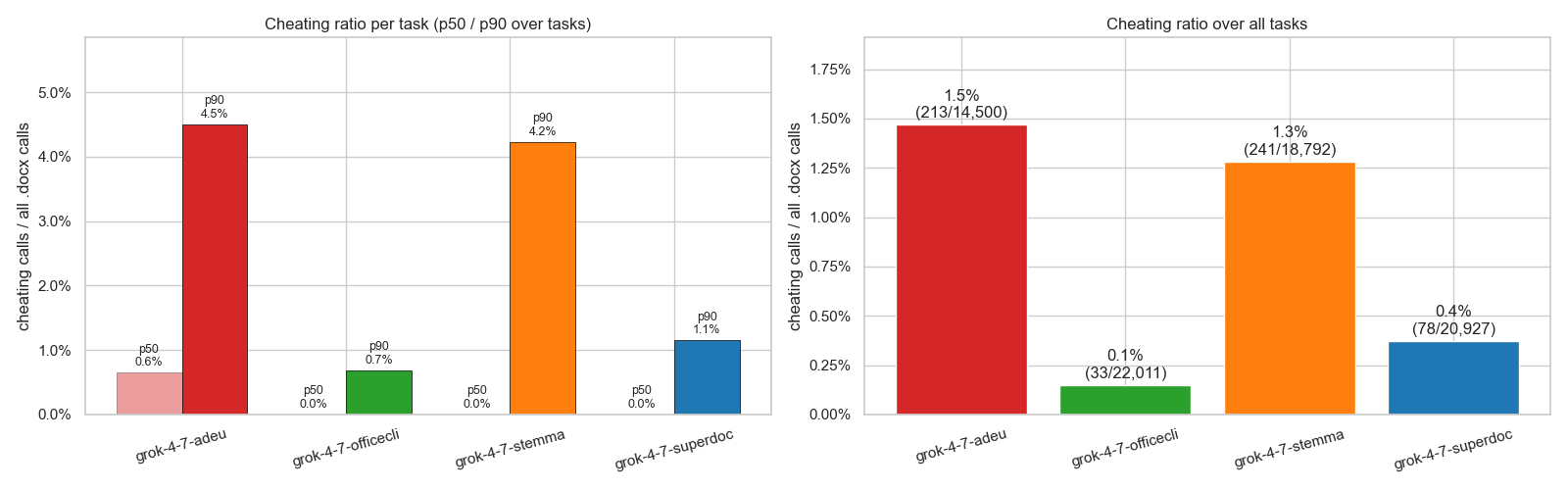
We see that cheating was not a common thing, which is reflected in a very low/zero median across the 4 arms. Our prompt instructions, plus the fact we removed python-docx + docxtpl, helped keep the model in check and make it mostly use the DOCX MCP.
Baseline internal turns
We wanted to dig a bit deeper into what's going on in the baseline experiment. We've spoken to a lot of legaltech companies, and this seems like the most popular approach out there, i.e. building a custom harness with a sandbox, python-docx, and LibreOffice. Some even take a very opinionated harness e.g Claude Code and just tune its prompt and tools.
Specifically, we wanted to know a few things:
- How many Python programs does an agent write with this approach?
- How long are those programs? Are they ephemeral scripts (written on the fly with
python - << 'PY') or static files likebuild_document.py? - Do those programs hit any errors? If so, how many and what kind?
Here are the numbers from the baseline experiment.
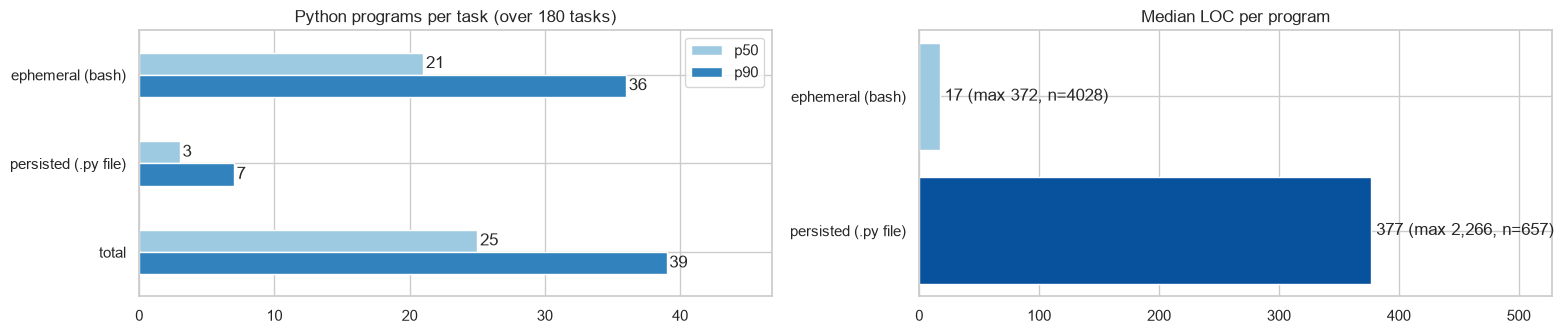
A few things stand out here.
- The median task ran 25 Python programs, and most of them were ephemeral (a median of 21 ephemeral scripts vs. 3 static files).
- The ephemeral scripts are quite short (a median of 17 LOC) and seem to be mostly exploratory. The static files are usually longer and do the actual work of creating or editing the document.
We also wanted to dig into the errors these scripts hit and what kinds of errors they are:
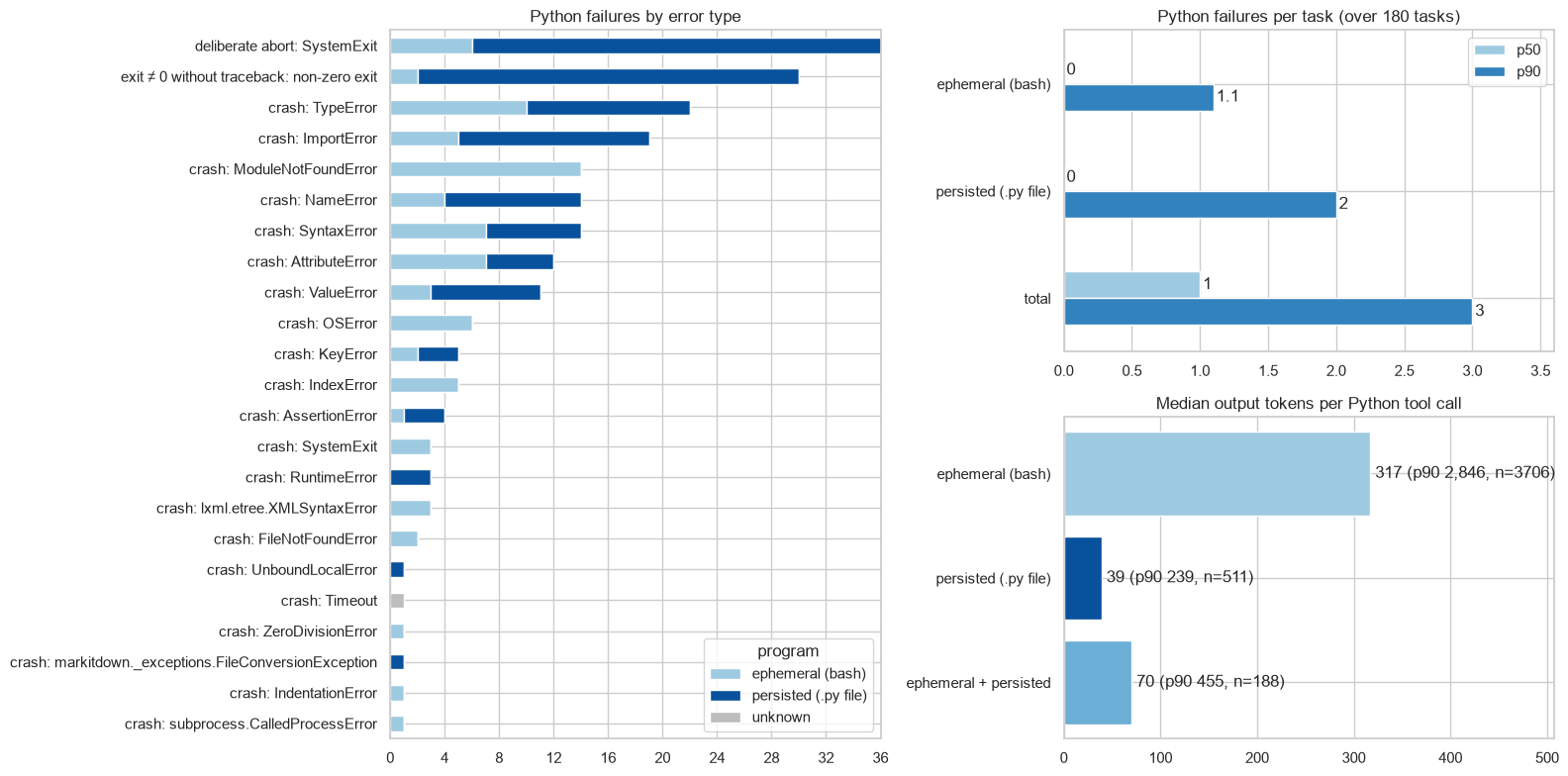
We see here that most tasks didn't experience errors (0 errors as the median), and also their output is quite short. Meaning, the scripts' output is dense and informative.
Caveats
- One model - we only ran grok-4.7, which was both the agent and the judge. Since every arm used the same model, this shouldn't favor one arm over another, but the numbers could look different with Claude or GPT models (or even a dual judge, like what Harvey provides).
- Harvey's harness - The harness is a very basic one. It has no compaction or tool result trimming, for example, which hurts MCPs that return big tool responses (like SuperDoc). Other harnesses might score differently.
- Sample size - We ran 180 of the 360 matching tasks, so small gaps between arms (e.g. baseline vs. OfficeCLI on all-pass rate) could be noise.
Conclusions
In this post, we compared 5 approaches to editing Word documents on Harvey LAB. Overall, the baseline (python-docx and LibreOffice) had the best mean rubric score and came second on all-pass rate, right behind OfficeCLI. It was also the cheapest arm, the only one that finished all 180 tasks, and had the cheapest and fastest editing phase. Looking inside it, the agent writes around 25 Python scripts per task, mostly short exploratory ones, and rarely hits errors.
That's a bit counterintuitive, since MCPs are supposed to take load off the agent. In practice, they consumed more tokens, and some of them ran out of context before finishing. Cheating was rare, so these numbers reflect the MCPs themselves rather than the agent going around them.
We also showed that editing .docx is still a token-hungry task for agents on an absolute level. Editing accounted for 85% to 95% of the input tokens in every arm, and even the baseline's editing phase had a median of 6M input tokens and $5.85 per task.
We'd love to hear what others are seeing. If you're building agents that edit .docx files, which approach are you using, and does this match your experience?