DOCX tracked changes API: redline a contract with an agent
Return agent edits as native Word tracked changes. Run a Python contract-editing example with a sample DOCX, revision authors, and preservation checks.
On this page
To let a reviewer accept or reject an AI edit in Word, return a DOCX containing native tracked revisions. A textual diff in your application and a Word file with tracked changes are different outputs. Vespper's edit_document tool records new edits as Word tracked changes by default, and lets an integration set the revision author or turn tracking off.
The Vespper API reference describes these settings. This guide covers the editing and review workflow, including what happens when the input already contains pending revisions.
Inspect a real API result
On 29 September 2026, we ran the contract fixture below through Vespper in two modes. Both outputs changed the bold payment term from 30 to 45 days and retained the other reviewer's two pending confidentiality revisions.
| Mode | Download the actual API output | Structural result |
|---|---|---|
| Tracking enabled | Redlined DOCX · check report | 15 checks passed, with font-property normalization reported. |
| Tracking disabled | Direct-edit DOCX · check report | 13 checks passed, with the same qualification. |
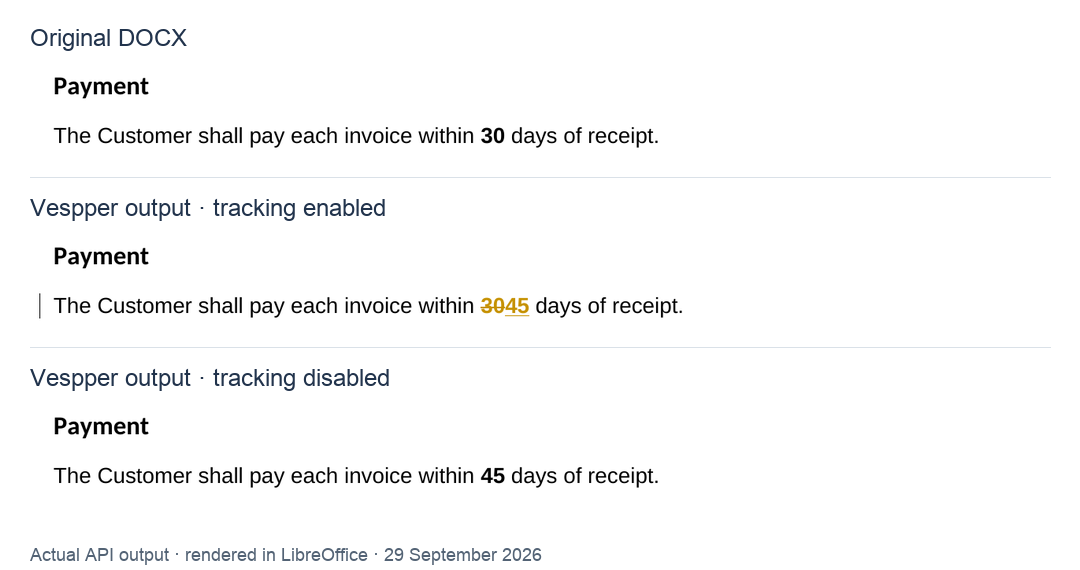
The preview uses crops of the actual LibreOffice renders. The one-page input and both outputs were inspected for layout, including their table, list, image, header and footer. Native Word accept/reject interaction was not part of this recorded check.
What “passed with normalization” means: Vespper added matching complex-script font properties in the table header and page header/footer. Those locations retained their appearance in this ASCII-text fixture, but their XML was not identical. The verifier reports the additions rather than treating them as byte preservation. The complete results and original strict failures document the difference. These are two runs on one fixture, not a benchmark across arbitrary Word files.
Run a contract redlining example
Suppose your product receives an existing contract and a user asks: “Change the payment term from 30 to 45 days. Keep the number bold and leave the other reviewer's pending changes alone.” The deliverable is an edited DOCX that the reviewer can open and review in Word.
Download the complete Python example. The archive includes the editing script, verification script, dependency versions, setup instructions, and recorded outputs in results/. You can also download the sample service agreement separately. It is a fictional test document, not a contract template.
The input contains one payment clause with 30 in bold. A separate confidentiality clause already has a deletion and insertion attributed to “Counterparty reviewer.” It also contains a table with a merged row, a numbered list, a hyperlink, an image, and a header and footer. These give the example specific things to check outside the requested edit.
Unzip the archive, enter its directory, and create a Python 3.10+ environment:
python3 -m venv .venv
source .venv/bin/activate
python -m pip install -r requirements.txt
Create a local .env containing VESPPER_API_KEY=your_key, using a key from your Vespper account. The archive's .gitignore excludes local credentials and generated outputs. Run the fixed MCP sequence first:
python redline_contract.pyThis path requires a Vespper API key and makes metered Vespper calls. It finds the unique payment clause and changes the number in its returned HTML without a separate agent-model call. Vespper's service still uses its own model to reconcile the edit. The fixed sequence isolates document integration from an agent's tool selection. The core edit uses the current search result:
old = matches[0]["match_text"]
edited = checked_result(await mcp.call_tool(
    "edit_document",
    {"edits": [{"old": old, "new": replacement(old)}]},
    meta={
        "com.vespper/session-id": session_id,
        "com.vespper/author": "Contract assistant",
        "com.vespper/track-changes": True,
    },
))
document = base64.b64decode(edited["base64"], validate=True)
This excerpt belongs to the downloadable script; replacement changes a single text-node occurrence of 30 and preserves the surrounding HTML. It refuses ambiguous matches or an unexpected text representation. It is deliberately specific to this fixture, not a general contract-editing algorithm.
To let an agent choose and call the tools, add OPENAI_API_KEY and OPENAI_MODEL to your local environment or .env, selecting a model available to your account. Then run:
python redline_contract.py --agent --output service-agreement-agent.docxAgent mode sends the instruction above through the OpenAI Agents SDK. The Vespper SDK supplies the MCP tools, attaches the session and tracking metadata, and retains the updated document bytes. It keeps the server's tool descriptions. Agent tracing is disabled in this example; model requests still go to the configured provider and incur its usage charges. The recorded outputs above use the fixed MCP path; the optional model-driven path is not presented as a live-tested run.
Check the returned DOCX
The script writes the returned document and a .checks.json report beside it. A saved file is a candidate until the checks pass: the script exits with an error if they fail. It refuses to overwrite an existing output, so choose a new filename for each run.
| Check | Required result for this fixture |
|---|---|
| Requested edit | The proposed text changes only the payment term, from 30 to 45 days. |
| Native revisions | A new deletion contains 30; a new insertion contains 45, both attributed to “Contract assistant.” |
| Existing review state | The two “Counterparty reviewer” revisions retain their content, author, date, and revision ID. |
| Formatting and structure | The payment number remains bold; unedited body structure is preserved apart from explicitly reported matching font properties. |
| Package contents | The image, styles, numbering and theme retain their bytes; existing relationships remain present. Header/footer structure permits only the reported matching font additions. |
You can rerun the structural checks independently, without API credentials:
python verify_contract.py service-agreement.docx service-agreement-redlined.docxTo check the bundled recorded output before making any API call, use results/service-agreement-redlined.docx as the second argument. A report with status: "passed_with_normalization" identifies allowed additions in font_property_additions; conflicting values and unrelated changes still fail. It does not mean every ZIP member stayed byte-identical.
These checks are specific to the supplied fixture. They are stricter than a text comparison, but do not certify visual fidelity or support for every Word feature. Open the output in Word, inspect the payment clause with revisions visible, and confirm that accepting or rejecting the payment change leaves the confidentiality revisions pending. The formatting guide explains the remaining visual checks.
To exercise the same change with tracking disabled:
python redline_contract.py --tracking-off --output service-agreement-direct.docxThe recorded direct-edit output contains the new payment term with no new text revisions, while the two existing revisions remain pending. A new run exercises the same checks against the file your account actually receives. Keep the recorded outputs in results/ separate from your new candidates.
Set the author and tracking behavior
The session ID identifies the document. The author and tracking flag describe how the next edit should be recorded. In a manual MCP integration, these values go in _meta:
{
  "_meta": {
    "com.vespper/session-id": "YOUR_SESSION_ID",
    "com.vespper/author": "Proposal assistant",
    "com.vespper/track-changes": true
  }
}
This is a metadata fragment, not a complete request. SDK integrations can configure the equivalent author and tracking options when patching their MCP client. Setting the tracking flag to false applies new edits directly. It does not automatically accept, reject, or remove revisions already in the document.
Propose edits as suggestions instead
Tracked changes and suggestions solve different review problems. Tracked changes are a way to record an edit that has already been applied. In suggestions mode, the document stays unchanged until the user accepts an edit.
Enable it when patching the MCP client with suggest=True in Python or suggest: true in TypeScript:
await client.patch_mcp_tools(
    mcp=mcp,
    session_id=session_id,
    suggest=True,
)
This is an excerpt, not a standalone program. With suggestions on, read_document and search_document behave as before. edit_document only locates each old/new edit against the current document and returns it as a suggestion instead of applying it.
Your client shows each suggestion, and the user can change its HTML, accept it, or discard it. Your API then sends the accepted pairs to apply_edits() (applyEdits() in TypeScript), which applies them in parallel. Each outcome's position is the edit's index in the list you sent. apply_edits() accepts any session ID, so the request that applies suggestions does not have to be the one that ran the agent.
Suggestions fit products that show proposed edits in a chat or side panel before anything touches the file. Direct mode with tracking on fits workflows where reviewers work inside Word. The suggestions reference and the live editing overview cover streaming suggestions as the model writes them, and the ONLYOFFICE add-in cookbook shows both modes in an editor.
Supply the final text of the replacement
Read or search the document first. Supply the current HTML block as old and the intended final version as new. For ordinary new edits, do not manufacture <ins> or <del> tags: the editing tool creates the revision markup according to the configured tracking setting.
For a deadline change, the intended result is that the old day is marked as deleted and the new day as inserted. A viewer may show both while the revision remains pending. That display is expected and is not a reason to repeat an edit that already succeeded.
Keep unrelated pending revisions intact
Vespper represents existing revisions in its reading output with <ins> and <del> elements and a data-author attribute. When a user asks to resolve a specific change, copy its complete current block and preserve other pending changes in that block.
| Requested action | Intended final content for that revision |
|---|---|
| Accept an insertion | Keep the inserted text and remove its pending-insertion wrapper. |
| Reject an insertion | Remove the inserted text and its wrapper. |
| Accept a deletion | Remove the deleted text and its wrapper. |
| Reject a deletion | Restore the text without its pending-deletion wrapper. |
These operations are scoped to the revision the user asked about. Follow the existing-revision rules, including author preservation when modifying a pending change. Flattening all revision markup would also resolve changes the user never selected.
The table describes text insertions and deletions. It is not a universal implementation of “accept all”: Word revisions can also involve moves, formatting, and table structure. Check the revision types present and the engine's supported scope before offering that operation. Comments are separate objects; verify what happens to a comment when its anchored text is deleted or its revision is resolved.
Read text without silently resolving revisions
Before extracting plain text, choose whether the application needs proposed wording, original wording, or the pending review state.
| View | Inserted text | Deleted text |
|---|---|---|
| Proposed wording | Include | Exclude |
| Original wording | Exclude | Include |
| Review representation | Keep with provenance | Keep with provenance |
The python-docx Document API notes that paragraphs inside revision containers are omitted from document.paragraphs. Issue 1123 records the resulting missing-text problem. Concatenating every XML text node is not a general repair: it can join deleted and inserted alternatives into wording the author never wrote.
Use a revision-aware extractor or resolve revisions on a separate copy with an implementation that supports those revision types. Producing a proposed-text view does not accept changes in the source file, and reading a file is not authorization to resolve its pending suggestions. For an editing agent using Vespper, keep the returned revision wrappers and authors in the current HTML anchor.
Connect the example to your product
The sample proves a narrow workflow only when its output passes your checks. Extend it with documents and revision types your customers actually submit. The agent integration guide covers session ownership, partial edits, and delivering the latest file through your application.
The Word add-in example follows Word's tracking mode when submitting a request. A background agent should instead expose and document its own tracking policy.
If you are implementing this with python-docx, its comment API and ordinary text setters are not a tracked-edit API. The Python guide covers that distinction for version 1.2.0. Review comments are useful, but adding a comment does not convert a direct text replacement into a tracked insertion and deletion.